
5 Best Accounting Software for Bookkeepers: A Beginner’s Guide
The 2024 Intuit QuickBooks Accountant Technology Survey highlights how technology is arming the industry with the tools it needs to stay ahead and responsive. Of 1,046 UK accountants and bookkeepers, 75% have felt extra demand from clients for support with financial management.
Accounting software is a cloud-based digital tool that keeps your finances organised and updated.
Bookkeepers play a crucial role in your business’s accounting department. This tool helps modern bookkeepers transform their working process into a more productive one, enhancing their work capacity.
At TAJ Accountants, we are here to provide detailed information about the best accounting software UK. You will learn about this software’s features, benefits, pricing, pros and cons from this guide. Stay tuned!
What is Accounting Software?
Accounting software is a program that helps bookkeepers accurately and quickly record daily financial transactions. This digital application has a single dashboard with multiple features, including:
- Record Transactions
- Manage Invoices & Bills
- Bank Reconciliation
- Financial Management
- Payroll Management
- Tax Management
- Cloud Automation
5 Best Accounting Software and Their Users
- QuickBooks Online: Best for in-house, freelance/ self-employed, and professional/certified bookkeepers & firms.
- Xero: Suitable for professional bookkeepers, remote bookkeepers, and small bookkeeping firms.
- Zoho Books: Ideal for project-based, small business, product-based, and Zoho practices bookkeepers.
- Fresh Books: Bookkeepers for Micro businesses, bookkeepers focused on time-based billing, and individual bookkeepers.
- FreeAgent: For bookkeepers who work with small businesses, want automation, and work with UK clients.
Stay Updated
Get expert accounting advice tailored to your business needs
Which Features Should Your Accounting Tools Have?
Bookkeepers perform multiple tasks related to daily data transactions, including tracking income and expenses, reviewing bills, matching invoices, and preparing tax documents.
Therefore, they need to select tools that match their accounting tasks, business size, specific needs, complexities, and UK compliance requirements.
A bookkeeper needs to consider the features, including:
Automation and Integration
Automation and integration are crucial for the accounting software you choose. Because it saves 50+ hours every week, you can serve more clients at once.
It minimises errors and makes bookkeeping processes speedy to analyse data deeply and craft a business strategy for future decision-making.
Financial Reporting
It not only ensures accurate recording of data but also helps identify revenue streams, cost savings, and overall performance.
A financial analysis dashboard shows not just numbers, but a clear way to enhance decision-making and strategic planning.
Compliance and Security
UK SMEs must stay updated with HMRC compliance. So, the software must be approved by HMRC & used according to ICB guidelines.
It ensures that the software system supports tax & VAT returns and Making Tax Digital (MTD) submission directly to the HMRC.
Again, with rapid business growth, you need access to sensitive financial information to perform your jobs. It keeps business’s confidential data secure.
Accessibility
Software must be easily accessible from a mobile device. It allows you to see your finances, sales, and cash flow from anywhere and anytime.
You can send invoices on the go. Also, you can upload your payable and receivable payment receipts by snapping instantly.
Multi-User Collaboration
Multi-user features make accounting software more reliable for real-time updates, avoiding errors, and effective teamwork.
It allows you to work with business owners directly.
Inventory Management
You can track your inventory, automatic stock updates, reorder alerts, and cost-of-goods-sold (COGS) calculations with the help of good software.
Additionally, you can manage your sales and stock at your own pace.
Payroll Management
Payroll features are essential for managing employee salaries, deductions, pensions, and HMRC PAYE submissions.
It speeds up the payroll process, reduces the risk of legal errors and simplifies employee management.
Customisation and Scalability
Customizable chart of accounts, custom invoice templates, and custom reports allow you to customise business offerings.
It should also be easy to add new features or upgrade plans as the business grows.
Top 5 Accounting Software Overview
Accounting software for UK bookkeepers assists them in doing more advanced tasks as accountants to meet their clients’ needs.
Software | Starting Price | Free Trial | Best For | Ease of Use | Support |
QuickBooks Online | From £16-£123/month | No free plan, 30-day trial | For invoicing, expense tracking, & MTD VAT submission | Very easy and beginner-friendly | 24/7 live chat, phone, help centre |
Xero | No free plan, 30-day trial | Suitable for bills, invoicing, and expense management | Easy-to-use interface | Email & chat support, extensive guides | |
Zoho Books | £19-45 per month | Free plan available for solotraders, 14-day trial | Client portal, invoicing, journal entries | Very easy Simple dashboard | Email, live chat, |
FreshBooks | From £6-£20 /month | No free plan, 30-day trial | Ideal for time tracking, invoicing, and simple reports | Easy & user-friendly | Phone, email, webinars |
FreeAgent | From £9/month, -£84/year | Conditional free plan, 30-day trial | Basic reporting, VAT, and self-assessment filing | Easy ideal for UK small businesses | Email support, detailed guides |
Protips: Many software offer different plans for different types of users. Choose the plan that has only the features you need to maximise money saving.
Here’s a detailed breakdown of the 5 Best accounting software
QuickBooks Online
QuickBooks Online is the most popular and widely usable accounting software among UK SMEs. It is tailored to save the time that you spend managing your business finances for bookkeepers. In the UK, out of 96,000 SMEs, 26,000 have selected QuickBooks as their accounting tool. Though it is best for larger businesses with full accounting departments.
Key Features:
- Tracking sales, invoices, and cash flow
- Creating Expense and Pay Bills
- Managing your customers and suppliers
- Monitoring your bank data, tax, and filing tax returns
- All rich features are available on all plans
Pros | Cons |
● Rich feature invoicing, bank reconciliation, and reporting ● Accept payments via QuickBooks Payments ● Large ecosystem; many app integrations ● Widely used; familiar to bookkeepers | ● Not a competitive price ● Limited customer support ● Payroll may expensive
|

Xero
With more than 4.6 million users, Xero is another renowned accounting software in the bookkeeping industry. It helps you track your finances accurately and quickly. It offers some limited plans at affordable prices for small and growing businesses in the UK. It supports multi-currency (160+) invoicing.
Key Features:
- Bank connections & reconciliation
- Projects tracking, planning & budgeting
- Online invoicing & purchasing orders
- Finance analysing & reporting
- Integrates with Gusto for payroll
| Pros | Cons |
|
|

Zoho Books
For 29 years, Zoho has been a popular accounting tool for Zoho-product users, including bookkeepers and solopreneurs. To provide the best service to clients, they continually update their features and tools as trends and regulations evolve in over 150 countries. It allows you to go from business estimate to project to invoice to payment at 100% free.
Key Features:
- In the free plan, you can manage 1000 invoices/year & 1099 contractors,
- Tracks your SME’s expenses
- Provides accurate bank reconciliation
- Provide analytical financial reporting
- Keep your SME tax compliant
Pros | Cons |
|
|

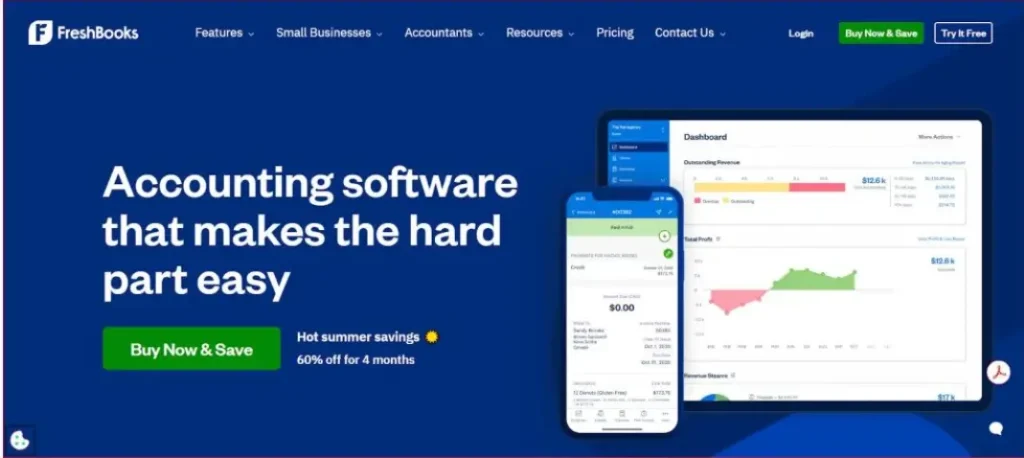
FreshBooks
FreshBooks is an exceptional accounting tool tailored for single users to send a very few invoices. It is easy for freelancers, small businesses, and contractor businesses. Over 30 million SMEs are saving up to $7000 in billable hours every year by using FreshBooks.
Key Features:
- Get Visibility and Create Collaboration
- Track your projects and time with clients
- Keep your payment flexible
- Manage all your tools and team work all in one place
- Keep track of cash inflows and outflows.
Pros | Cons |
|
|
FreeAgent
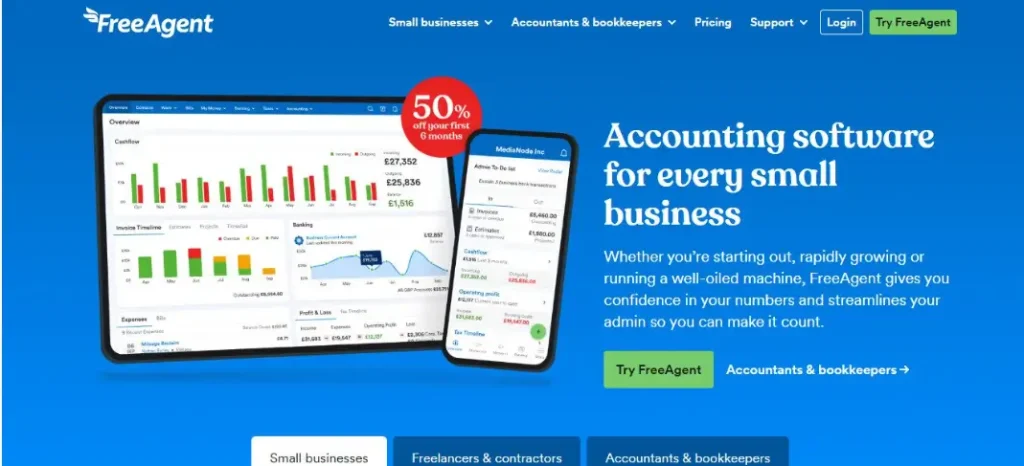
FreeAgent is another accounting software trusted by over 200,000 businesses. It’s a hassle-free accounting tool with an easy-to-use interface. You can send unlimited invoices even lower plan. Time tracking is included on all plans. It keeps your accounting tasks easy and accurate, thus you can focus more on your business.
Key Features:
- Send & track invoices and monitor your cash flow
- Record your complete time on smart timesheets.
- Keep track of your due tax bills
- Automatically import transactions from your bank account.
- Thorough overview of your income, expenses, and profitability.
| Pros | Cons |
|
|
Accounting Software Choosing Checklist
Choosing the right accounting software directly affects the speed, accuracy, and ease of your financial work. With so many options with similar features on the market, it’s confusing to select the perfect one. The checklist below will help you quickly understand which accounting software is best suited for your bookkeeping tasks. Let’s start checking-
Compare Prices and Free Trials
Pricing is crucial to set up software for accounting tasks. Consider the free plan. If there is no free plan, select their trial offers. Select the software that matches your budget.
Understand Business Types and Complexities
Determine which tasks are most important to you, such as your transaction volume, invoicing, payroll, and inventory. Based on these, choosing the right software will be easier.
Check For Automation and Integration Features
Bank sync, automatic categorisation, recurring invoices, and automatic reconciliation save time and reduce errors.
Make Sure HMRC-Approved and MTD Compatible
The most important thing for the UK is that the software is HMRC-approved and can submit Making Tax Digital (MTD) returns directly.
Look at The Quality of Reporting and Analytics
Dashboards, profit and loss reports, balance sheets, and cash these reports make decision-making easier if they are clear and accurate.
User-Friendly UI
A complex interface wastes time. A simple and modern UI, especially convenient for new bookkeepers.
Ensure Data Security and Access Control
User permissions, data encryption, and secure backup keep your financial information safe.
Mobile Access and Cloud Support
Viewing data from anywhere, anytime, sending invoices or uploading receipts are now essential features.
Check The Scalability of The Software
Scaling capacity is very important so that new features, users or add-ons can be easily added as the business grows.
Check for Customisation Facilities
Customised reports, invoice templates, and charts of accounts help you customise the software according to your type of business.
Consider the Quality of The Support Team
24/7 support, quick answers, tutorials, and a community all of these make your job easier
What Benefits Will You Get Using Accounting Software?
Choosing the right accounting software is important when UK SMEs struggle due to funding and high operating costs. It’s not just about keeping records; it relates to keeping the business running and strengthening the entire financial system. Using the wrong software can lead to data mismatches, wasted time, and even financial risks. So, it’s important to keep in mind the things that are given the most importance according to popular search trends:
- Automated transaction management: Reduces manual data entry, saves time and reduces the possibility of errors.
- Expense tracking and reporting: Provides a clear idea of how much is being spent in which sector, which influences business decision-making and planning.
- Invoicing and payment systems: Quickly create, send bills, and track payments to keep the business’s cash flow stable.
- Tax preparation and compliance: Simplifies tax calculations by keeping the business away from legal hassles.
- Cloud backup and security: Provides the convenience of accessing data from anywhere, anytime and keeps the information safe.
- Scaling and integration benefits: If the business grows, the software can be easily upgraded or integrated with other tools.
How TAJ Accountants Guide to Select And Set Up the Best Software
At TAJ Accountants, we offer various facilities to help you select the best software for your small business. We offer advanced guidance to keep the process simple and transparent.
Our working process includes:
Selecting The Perfect Software:
First, we analyse your business structure, size and required services, and help you determine which software will best fit your actual work.
Software Setup:
We guide you to set up the selected software in your account. For instance, a chart of accounts, bank connections, invoice templates, and reconciliation settings, all tailored to your business type.
Choosing The Right Package Based on Workload And Usage:
Our expert team help you choose a package that minimises costs and maximises benefits. It will vary based on your number of transactions, the type of work, and the team’s needs.
Provide a Complete Guide to Using The Software:
At TAJ, we provide full training and step-by-step instructions to help you use this tool seamlessly. This makes learning new tools easier and reduces the chance of mistakes.
Strategic Plan Towards Success and Sustainability:
We don’t just set up the software; we also create a realistic plan on how to make your business more efficient, sustainable, and financially stronger. We clearly lay out a roadmap, consisting of what tasks to automate, what reports to view regularly, and what data to use to make decisions.
Pro tip: Click here to get more info by booking a free consultation with our experts at TAJ Accountants.
Conclusion
Choosing the right accounting software not only makes the bookkeeper’s job easier, but also makes the financial management of a business more accurate, faster and more efficientQuickBooks, Xero, Zoho Books, FreshBooks and FreeAgent each have their own strengths, and the right decision depends on the type of business, workload and feature needs. Select one to increase the productivity of your business and reduce the risk of errors.
At TAJ Accountants, we provide full support to every SME in selecting, setting up and using the best software according to their needs. Our expert team doesn’t just teach you how to use the software, but also creates a clear roadmap on how to use it.. Don’t hesitate to contact TAJ Accountants for professional assistance to make your SME stronger and better.